Showing posts with label Filter Transformation. Show all posts

Sunday, February 21, 2016

filter out rows with null values in informatica

Various time ,we need to filter null values in informatica. We can remove them for further processing or other scenarios also . Check Informatica scenarios of filtering out rows with null values .
To filter our rows with null values , we can use it in Source qualifier's over ride SQL or you can use  filter transformation in informatica.
Must check : Normalizer Transformation in informatica
To filter out rows containing null values or spaces, use the ISNULL and IS_SPACES functions to test the value of the port. For example, if we want to filter out rows that contain NULLs in the FIRST_NAME port, use the following condition:
IIF(ISNULL(FIRST_NAME),FALSE,TRUE)
This condition states that if the FIRST_NAME port is NULL, the return value is FALSE and the row should be discarded. Otherwise, the row passes through to the next transformation.
Must check : Lookup Transformation in informatica

informatica isnull filter condition
how to handle null values in informatica
informatica filter is not null
filter null values in sql
filter null values in sql server
powershell filter null values
qlikview filter null values
isnull in informatica syntax

Tuesday, December 1, 2015

FILTER TRANSFORMATION IN INFORMATICA

Informatica Filter Transformation:

Filter Transformation is one of the most used transformation in Informatica which basically filter out the unwanted records from input data stream. Properties of  Filter Transformation:
  • It is an active transformation as it changes the no of rows passing through it
  • It is a connected Transformation
  • It is filter out those records which does’n satisfy its condition.
Must Read : You can check one good example of filter transformation in informatica

How to use Filter Informatica Transformation :
  • Filter Transformation can be added to the current by clicking on Transformation – > Create
  • Selecting the Filter Transformation and the create
  • Then we need to give some name , add the required input/output ports.
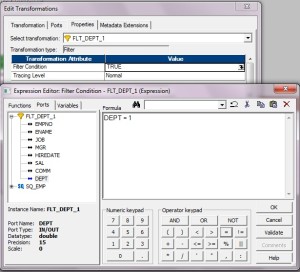
  • In the property  tab , we need to add the filter condition
filter-transformation-part4-300x272Filter Transformation
Note : Please note that  for one filter  we can generate only one type of target . To connect to multiple target with multiple condition we need to use Router Transformation

Must Read : You can check one good  article on Informatica Architecture

Performance Tuning Guidelines filter transformation :

  • Use filter closer to source to prevent the processing of unwanted records downstream .
  • If possible include these filter condition at source qualifier itself  ( in relation DB)
Creating Informatica Mapping:
  1. Open folder where we want to create the mapping.
  2. Click Tools -> Mapping Designer.
  3. Click Mapping -> Create -> Give mapping name. Ex: m_filter_example
  4. Drag EMP from source in mapping.
  5. Click Transformation -> Create -> Select Filter from list. Give name and click  Create. Now click done.
  6. Pass ports from SQ_EMP to Filter Transformation.
  7. Edit Filter Transformation. Go to Properties Tab
  8. Click the Value section of the Filter condition, and then click the Open button.
  9. The Expression Editor appears.
  10. Enter the filter condition you want to apply.
  11. Click Validate to check the syntax of the conditions you entered.
  12. Click OK -> Click Apply -> Click Ok.
  13. Now connect the ports from Filter to target table.
  14. Click Mapping -> Validate
  15. Repository -> Save
Incoming searching terms :- Informatica filter transformation, filter transformation scenarios in informatica filter transformation example in informatica filter transformation scenarios filter transformation informatica filter transformation in ssis filter transformation in informatica youtube filter transformation interview questions answers You can contact us by putting below contact form